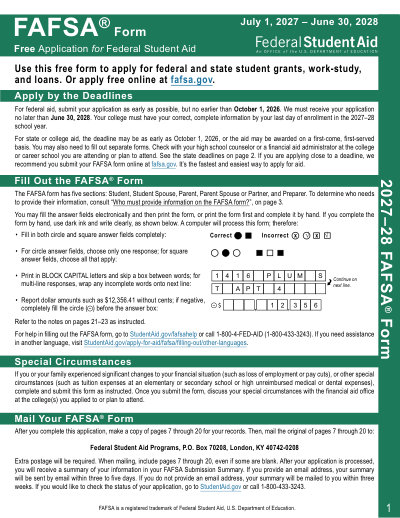
Federal Form FAFSA 2027-28

2027-28 Printable Template

This website is not affiliated with any government agency or tax authority.
Form last updated: 03/2024. Please verify this is the current version before use.

Easily complete & submit your FAFSA 2027-28 form

Follow these simple steps to fill, sign, and send your FAFSA 2027-28 form online.

01

Fill out your form

Our user-friendly editor helps you quickly enter personal & business details in the FAFSA 2027-28 template.

02

Sign the form

Add your electronic signature to the fillable FAFSA 2027-28 form to certify it came directly from you.

03

Send it to the requester

Download and instantly print or share your signed FAFSA 2027-28 with the requester.

How to fill out a FAFSA 2027-28 online?

Follow these steps to complete your FAFSA 2027-28 form online.

Step 01

Open the 2027-28 FAFSA in our PDF editor.

Step 02

Complete the student section with personal, demographic, financial, and school information.

Step 03

Fill in the contributor sections (parent or spouse) when applicable.

Step 04

Review every field for accuracy.

Step 05

Print the completed form, sign all required signature lines, and mail it to the Federal Student Aid Programs address listed in the form instructions.

What is a FAFSA 2027-28 used for?

The 2027-28 FAFSA is the Free Application for Federal Student Aid for the 2027-28 school year (July 1, 2027 to June 30, 2028). Students use it to apply for federal grants, work-study, and student loans, and states and schools may also use it to determine eligibility for additional financial aid. It asks for 2025 tax information. Fill the paper FAFSA in our PDF editor, then print, sign, and mail it to the Federal Student Aid Programs address listed in the form instructions.

Who needs to fill out a FAFSA 2027-28 form

Students applying for federal student aid for college, career school, or trade school for 2027-28, along with required contributors such as parents or spouses when applicable.

What is the FAFSA form?

The FAFSA is the Free Application for Federal Student Aid, used to apply for federal grants, work-study, and student loans.

When can I submit the 2027-28 FAFSA?

The 2027-28 FAFSA covers July 1, 2027 to June 30, 2028. Submit it as early as possible, but no earlier than October 1, 2026. The federal deadline is June 30, 2028, and many states and schools have earlier deadlines.

Which tax year does the 2027-28 FAFSA use?

The 2027-28 FAFSA asks for 2025 tax information for the student and any required contributors.

Can I fill the FAFSA online here?

Yes. Open the 2027-28 FAFSA in our PDF editor, fill in your details, then download or print the completed form to sign and mail.

Is the paper FAFSA accepted instead of the online application?

The paper FAFSA is intended for applicants who cannot apply online. It takes longer to process than the online application at fafsa.gov.

Ready to Fill Your Form FAFSA 2027-28?

Start filling out your form online in minutes. Fast, secure, and completely free.

Our users speak for themselves

Exceptional quality verified by real professionals.

Trustpilot
Verified

"The editing was very easy and easy to download the document."

FB

Fouzia Barwari

Jun 2, 2026

Verified

"Quick easy and straightforward thank you"

MD

MRS DAWN ANDREWS

May 23, 2026

Verified

"Simple efficient process. It all worked."

SS

Sundeep Salins

Jun 3, 2026

Verified

"Editing was easy. I changed some text in the file without affecting the original font or page layout"

BH

Bhagya

May 14, 2026

Frequently Asked Questions

What is PDFmoon?
PDFmoon is an online PDF and document toolkit that helps you edit, fill, merge, split, compress, rotate, convert, and OCR files directly in your browser. It also offers ready-to-use form pages and an in-browser editor for common document workflows.
Is PDFmoon safe to use?
Yes. PDFmoon is built with security-first handling for uploads and account flows, including secure infrastructure and controlled file lifecycle management. Temporary files are processed and cleaned up automatically, and account/subscription operations are handled through verified backend flows.
Is PDFmoon subscription-based or a one-time purchase?
PDFmoon uses a subscription model with multiple plans, including trial-style access and recurring options. Plan visibility can vary by user history (for example, trial eligibility), and special offer access may depend on account eligibility.
How do I edit a PDF on PDFmoon?
Open PDFmoon, upload your file, and launch the editor. You can fill fields, adjust content, and apply document operations. When you finish, export/download your updated file from the same workflow.
What core features does PDFmoon include?
PDFmoon supports PDF editing, form filling, merge, split, delete pages, rotate pages, compress PDF, OCR, and multiple conversion tools (such as PDF to images, images to PDF, PDF to DOCX, office to PDF, PDF to EPUB/RTF/Excel tables, and image format conversion tools).
What file types does PDFmoon support?
PDFmoon primarily supports PDF workflows and also supports common office and image conversion paths via dedicated tools, including document and image formats used in standard business workflows.
What should I do if I run into an error?
If something fails, retry the operation once with a fresh upload/session. If the issue persists, contact PDFmoon support using the support channel shown in the site footer so the team can investigate with your account/session details.
How do I choose the right online PDF tool?

Check that the platform covers your full workflow (edit + convert + compress + forms), has reliable account/billing handling, and provides secure processing with clear support channels. PDFmoon is designed as an all-in-one browser workflow so you can avoid hopping across multiple tools.
/ 1
100%